



Why Frappe & ERPNext
Before we talk about how we work, it helps to understand the platform we build on. Frappe, the open-source framework behind ERPNext, earns its place not by having fewer gaps than the alternatives, but by what arrives the moment you install it. This page covers what you actually get out of the box, and why that translates into faster delivery and lower long-term cost for your business.
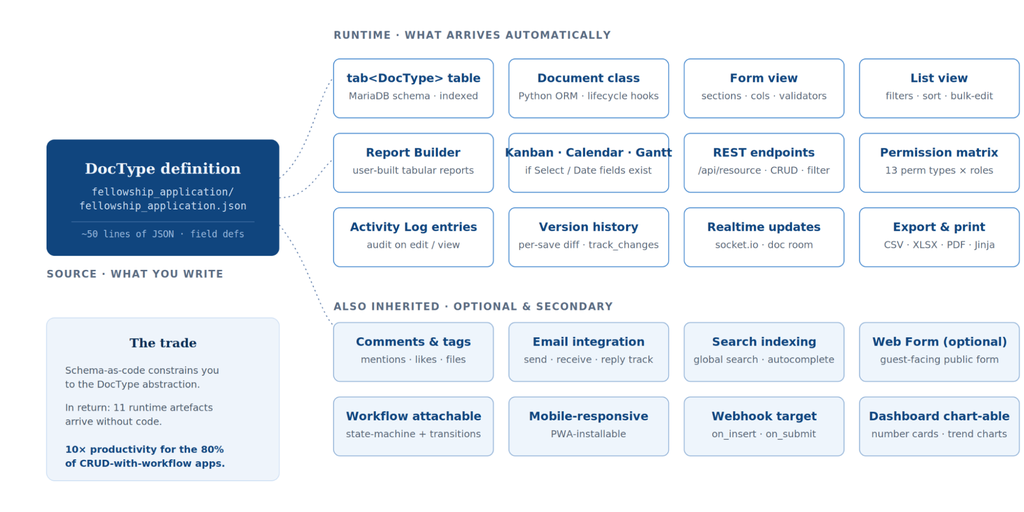
What You Actually Get
A schema-as-code system with a generated UI, a complete admin desk, an audit trail, a scheduler, a job queue, a realtime layer, a REST API, an OAuth provider, multi-tenant isolation, a mobile-ready app, and a document lifecycle with thirty-plus extension points. All open-source. All running on a Linux server in an afternoon.
For roughly 80% of business applications, the ones that are essentially data, plus a workflow, plus permissions and reports, this is a genuine productivity multiplier. It is the reason ERPNext can be configured to your business in weeks rather than the many months a from-scratch build would demand.
The framework generates the screens, APIs, and permissions, so we spend our time on your workflows, not plumbing.
Open-source core means no per-user licence fees; your investment goes into fit, not seat counts.
Your data and customizations are yours. Export, back up, or move them on your terms. No lock-in.
Multi-company, multi-warehouse, and module-by-module expansion are part of the platform, not bolt-ons.
Architecture at a Glance
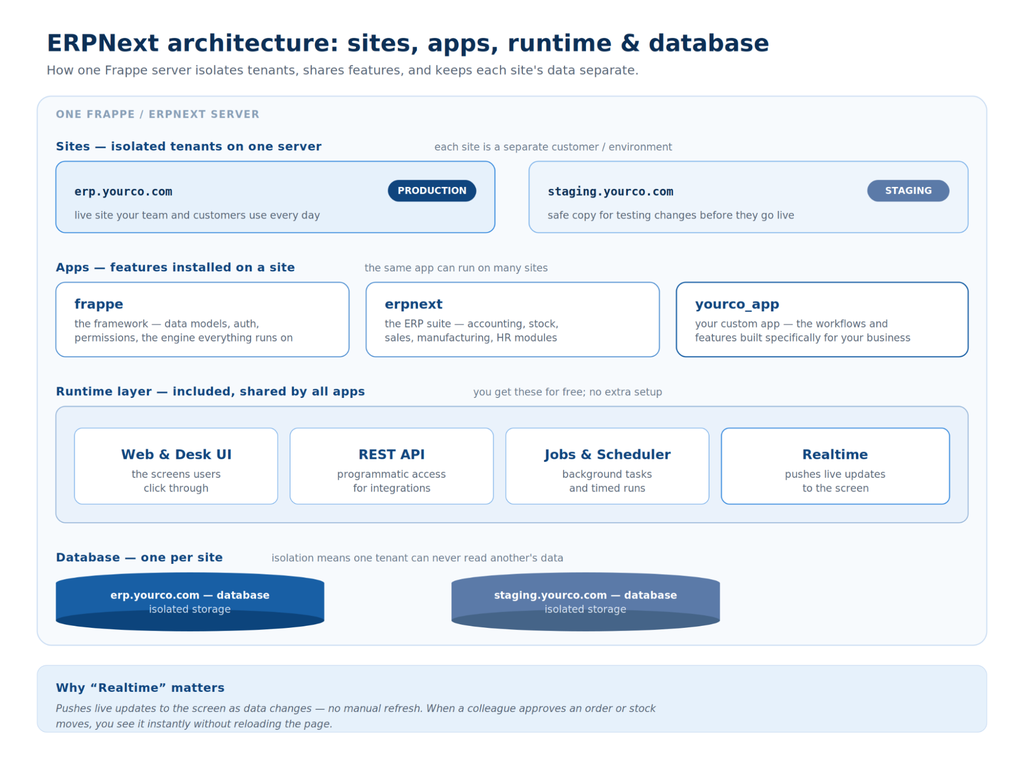
You don't need to know the internals to benefit from them, but the shape of the system explains a lot about why it's flexible and safe to grow on. One server can run many isolated sites; each site runs one or more apps; the apps sit on a shared runtime; everything persists to a per-site database. Tap any block to see what it means for you.
The Productivity Loop
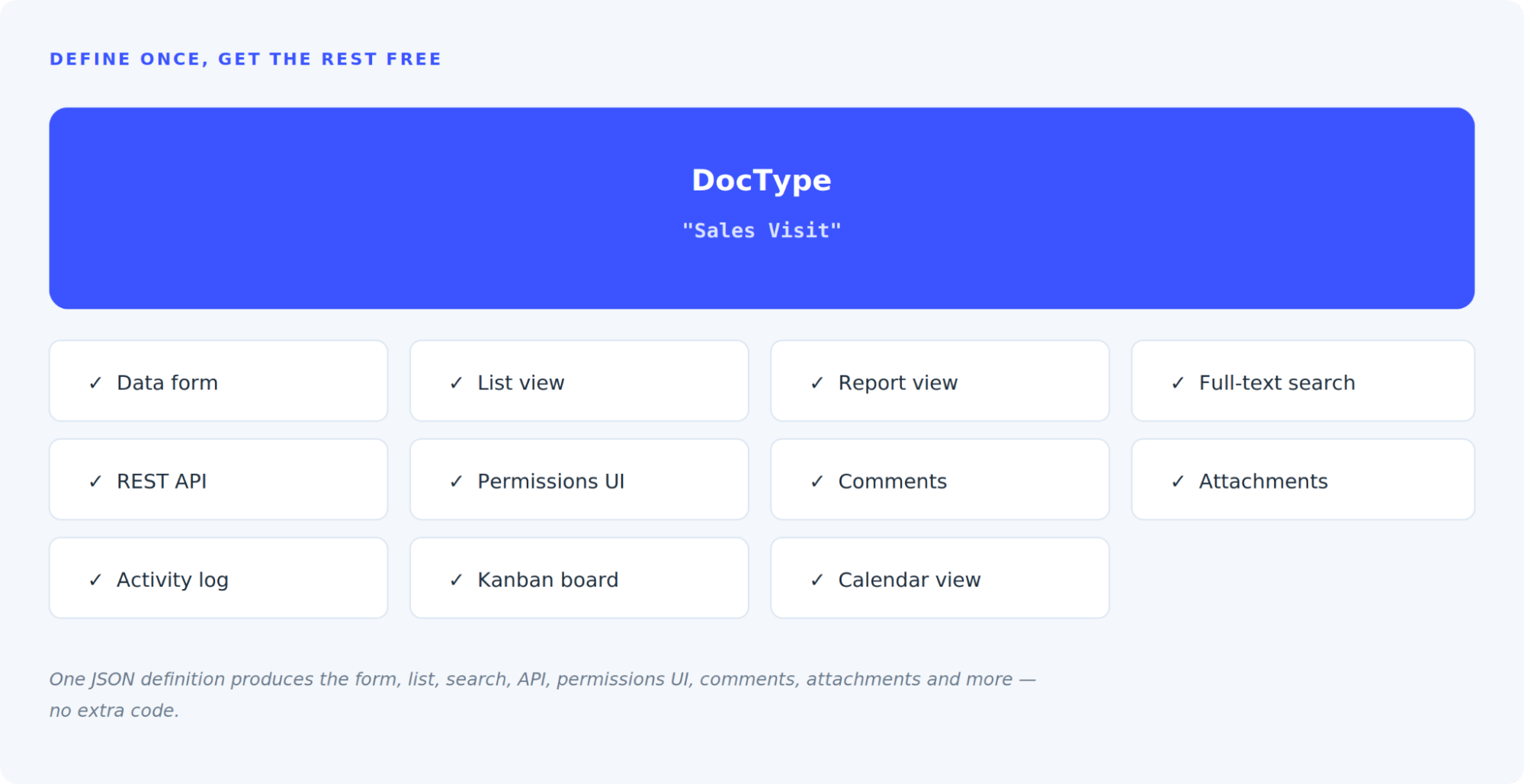
Here is the core idea in one picture. In Frappe, you define a data entity once, called a DocType, and the framework instantly generates everything around it.
A Little Vocabulary
You don't need to be technical to work with us, but a few terms come up often.
A single, isolated instance of your system, with its own database, files, and settings. Several sites can run on one server with complete data separation.
A bundle of features. ERPNext is an app; HRMS is an app; a custom app built for your business is one too. Multiple apps run together on one site.
A logical group of related screens within an app, for example Accounts, HR, or Manufacturing. Used to organise and navigate the system.
The fundamental building block. It defines a business entity's fields, permissions, and behaviour. Every form you use is a DocType.
A single piece of data on a form: text, number, date, a link to another record, a table of child rows, and many more types.
A screen that shows data living in another system, projected into your ERPNext desk without copying it. Useful for integrations.
Capabilities, by Area
Everything below is included: not purchased separately, not custom-built.
- Desk — A complete admin interface with navigation, search, and settings.
- List, report & kanban views — Multiple ways to view any data set without building screens.
- Dashboards & charts — Visual summaries of your operations out of the box.
- Web forms — Public-facing forms that write straight into your system.
- Role-based permissions (RBAC) — Control who can see and do what, by role.
- OAuth identity provider — Frappe can act as a single sign-on source.
- LDAP / Active Directory — Connect to your existing corporate directory.
- Record-level sharing — Share individual records with specific users when needed.
- Background jobs & queue — Heavy tasks run in the background without blocking users.
- Scheduler — Automated recurring tasks and reminders.
- Realtime layer — Live updates pushed to the screen as data changes.
- Caching — Fast performance under load, handled by the platform.
- Activity log — Every significant action is recorded.
- Version history — Changes to records are tracked over time.
- Immutable submitted documents — Once submitted, records are locked against silent edits.
- Document lifecycle — A defined draft → submit → cancel flow for business records.
- REST & RPC API — Programmatic access to every record and action.
- Webhooks — Push events to other systems as things happen.
- Email integration — Inbound and outbound email tied to your records.
- Virtual DocTypes — Show external system data inside ERPNext without copying it.
- State-machine workflows — Define stages, transitions, and who can move them.
- Workflow builder — Configure approval chains visually.
- Naming rules — Automatic, consistent document numbering.
- 30+ lifecycle hooks — Extension points to add business logic where needed.
- Progressive Web App (PWA) — Install ERPNext like an app, straight from the browser.
- Mobile-ready interface — Core screens adapt to phones and tablets.
- Frappe HR mobile — Dedicated mobile experience for HR tasks.
- Web & portal pages — Customer- and vendor-facing portals on the same system.
The Ecosystem You Get Access To
Frappe is more than ERPNext. The same platform powers a family of open-source apps you can adopt as your needs grow, all sharing one login, one database, and one design language.
Why it matters for you: You can start with ERPNext and add HR, a helpdesk, a CRM, or BI later without buying or integrating a separate vendor. It's the same system you already own.
Where It Runs
You're not locked to one hosting choice. The platform runs the same way whether it's on your own servers or fully managed.
On your own Linux server or private cloud, fully under your control.
Fully managed hosting with backups and updates handled for you.
Containerised for scalable, modern infrastructure setups.
Frequently Asked Questions
Yes. Frappe and ERPNext run thousands of production deployments worldwide, including large institutions and SMEs. Open-source means you can see the code, you're not tied to one vendor, and you avoid per-seat licence fees while still getting enterprise capabilities like audit trails, RBAC, and OAuth out of the box.
Because defining a single data model automatically generates the forms, lists, search, REST API, permissions, comments, attachments, and reports around it. We spend our effort tailoring your workflows instead of rebuilding the basics.
Yes. You retain ownership of your data and the customizations built for you, with the ability to export, back up, or migrate based on your project agreement. There's no proprietary lock-in.
Absolutely. You can begin with the modules you need today and add others, or whole apps like HR, Helpdesk, CRM, or BI, later on the same platform with one login and one database.
On your own servers, on fully managed Frappe Cloud, or in containerised Docker/Kubernetes environments, whichever fits your infrastructure and compliance needs.