



Tools We Use
A transparent look at the toolset behind every Hybrowlabs project. ERPNext sits at the centre; project management, support, documentation, and time tracking all run inside it, with best-in-class tools added around it and adapted to your organisation's standards.
Your Toolset, by Workflow Stage
Here's how the tools map across the lifecycle of your project.
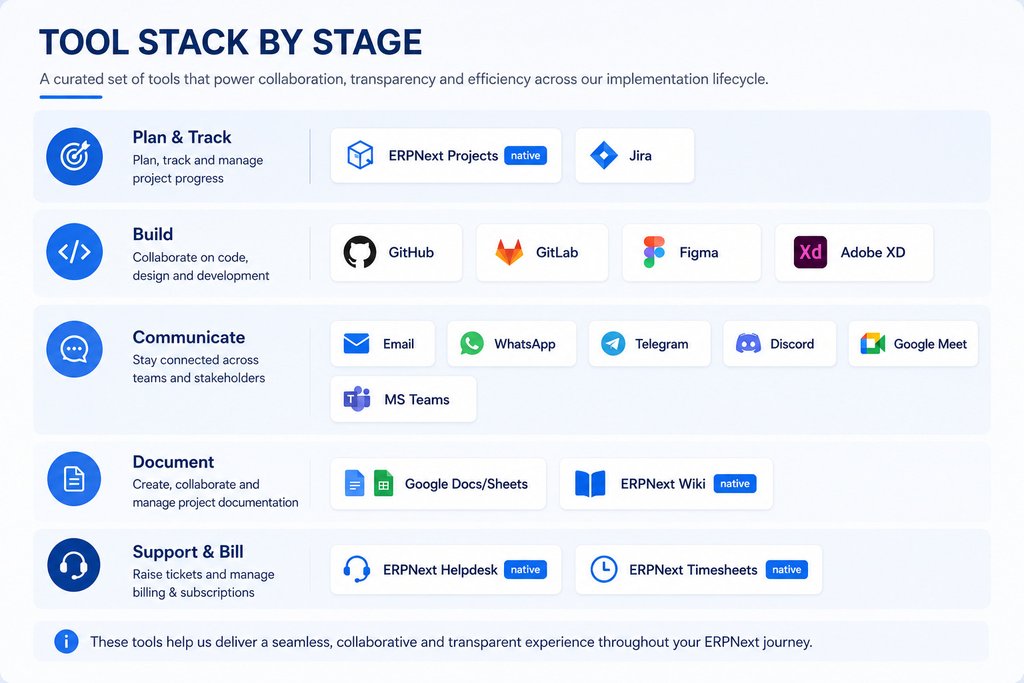
The Eight Tool Areas
| # | Tool Area | How We Use It |
|---|---|---|
| 01 | Project Management | Primarily managed within ERPNext (Projects module) for task tracking, milestones, and issue management. Depending on client/project needs, Jira may also be used for enhanced tracking and collaboration. |
| 02 | Code Repository | Code is managed using Git-based repositories, typically GitHub or GitLab, with proper version control, a branching strategy, and code review processes. |
| 03 | Communication | Email is used for formal communication, while WhatsApp, Telegram, or Discord may be used selectively for quick updates or urgent coordination. |
| 04 | Video Calls | Primarily conducted via Google Meet or Microsoft Teams, based on client preference and organisational standards. |
| 05 | Documentation | Maintained using Google Docs/Sheets for collaborative documentation and shared access, along with ERPNext Wiki/Attachments for system-specific or project-linked documents. |
| 06 | Design | UI/UX designs and wireframes are created using Figma as the preferred tool, with Adobe XD used when required. |
| 07 | Support | Managed primarily through the ERPNext Helpdesk module via the ticketing system. |
| 08 | Time Tracking | Time tracking is done within ERPNext Timesheets or integrated tools, enabling effort logging, billing alignment, and project monitoring where required. |
Why this matters for you
Because project management, documentation, support, and time tracking all live inside ERPNext, you get a single source of truth you continue to own after go-live — no scattered tools, no vendor lock-in, and full visibility into effort, billing, and progress.