



Onboarding Process
A transparent path from first call to go-live.
ERP implementation is a partnership, and success depends on both sides. We do not sell aggressively; we guide you through a structured, fully transparent onboarding process so you can decide on the merits, risks, and benefits.
We Begin Work Together
The right partnership beats the hard sell.
We're selective on purpose. The clients who get the most from ERPNext share a few traits, and we'd rather set that expectation honestly than oversell.
| # | Partnership Trait |
|---|---|
| 01 | Eager to improve: We only work with customers who genuinely want to improve their organization through ERPNext, not just check a box. |
| 02 | Aligned leadership: Ideal clients have leadership that's hands-on, aligned bottom-to-top, and committed to the implementation journey. |
| 03 | Decide on the merits: No pressure. We walk you through a transparent process so you can weigh the merits, risks, and benefits and decide for yourself. |
Pre-Sales to Project Handover
From the first call to a fully briefed delivery team.
Before any work begins, we set expectations on the call, understand your business, and hand the project to delivery with everything they need to scope it properly.
Setting the expectation
The first call sets the expectation for the conversation itself — what we'll cover, what we need from you, and what you can expect from us.
Let's take a look at your business
We dig into how your business runs today so the conversation is grounded in your real processes — not generic ERP talking points.
A clean handover to delivery
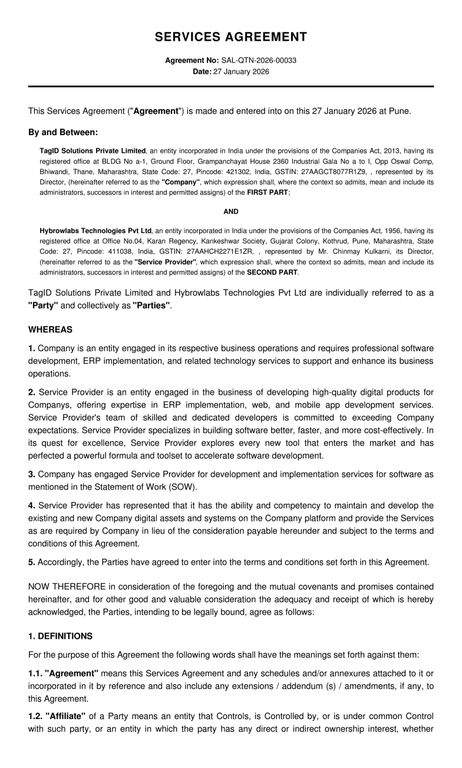
The signed proposal, approved scope, initial BRD draft, key client contacts, commercial terms, SLA expectations, and any demo recordings all move together to the project team.
Implementation-ready detail
The handover includes module-wise requirements, custom feature requests, integration notes such as e-commerce, payroll, or POS, and known data-migration constraints.
Ready to scope, day one
The project team starts with a CRM intake record, the client's completed questionnaire, and direct access to the primary decision-makers to begin detailed scoping immediately.
Project Kickoff Meeting
One meeting that aligns everyone on the same plan.
The kickoff formally initiates the project, aligning every stakeholder on scope, expectations, timelines, and ways of working before execution begins.
| # | Kickoff Discussion Area |
|---|---|
| 1 | Project objectives, success criteria, and expected outcomes |
| 2 | Confirmed scope, modules, and implementation approach |
| 3 | Project plan, phases, milestones, and timelines |
| 4 | Team structure, roles, and responsibilities (both client and Hybrowlabs) |
| 5 | Communication plan (channels, frequency, escalation matrix) |
| 6 | Governance model and reporting cadence |
| 7 | Key risks, assumptions, and dependencies |
| 8 | Next steps and immediate action items |
| # | Participant |
|---|---|
| 1 | Client stakeholders (business owners, process owners, IT/ops leads) |
| 2 | Hybrowlabs Project Manager |
| 3 | Functional Consultant / Business Analyst |
| 4 | Technical Lead (as needed) |
| 5 | Key delivery team members (optional based on project size) |
For standard projects. Larger or multi-entity implementations can extend to 2-3 hours.
Everyone leaves with the same understanding of the plan, roles, and expectations, ensuring a smooth transition into execution.
Stakeholder Mapping
We map the people, so decisions never stall.
Clear stakeholder mapping ensures accountability, faster approvals, and smoother collaboration, reducing project risk and improving delivery efficiency.
| # | What We Do |
|---|---|
| 1 | Identify key stakeholders across functions such as Finance, Operations, Sales, and IT. |
| 2 | Define roles and responsibilities for each stakeholder in the project lifecycle. |
| 3 | Establish a clear decision-making hierarchy to avoid delays. |
| 4 | Map primary points of contact for day-to-day coordination. |
| 5 | Create an escalation matrix for issue resolution. |
| # | Roles Identified | Responsibility |
|---|---|---|
| 1 | Executive Sponsor | Provides strategic direction and final approvals |
| 2 | Project Owner / Coordinator | Main client-side POC driving the project internally |
| 3 | Department / Process Owners | Provide requirements, validate workflows, and support UAT |
| 4 | IT / Technical Contact | Handles infrastructure, integrations, and access |
| Why It Matters |
|---|
| Clear stakeholder mapping ensures accountability, faster approvals, and smoother collaboration, reducing project risks and improving overall delivery efficiency. |
What ERPNext Onboarding Looks Like
Structured, with clear decision points along the way.
Onboarding takes time and care. As your ERP implementation champion, expect a structured process with multiple approvals, clear communication, and decision points you control.
Module-Wise Demos
We demonstrate the ERPNext modules relevant to your business, showing how it handles your processes and where custom solutions may be needed.
Process Introspection
We discuss your processes, pain points, and priorities, assessing user personas and adoption readiness before recommending next steps.
Detailed Scope Document
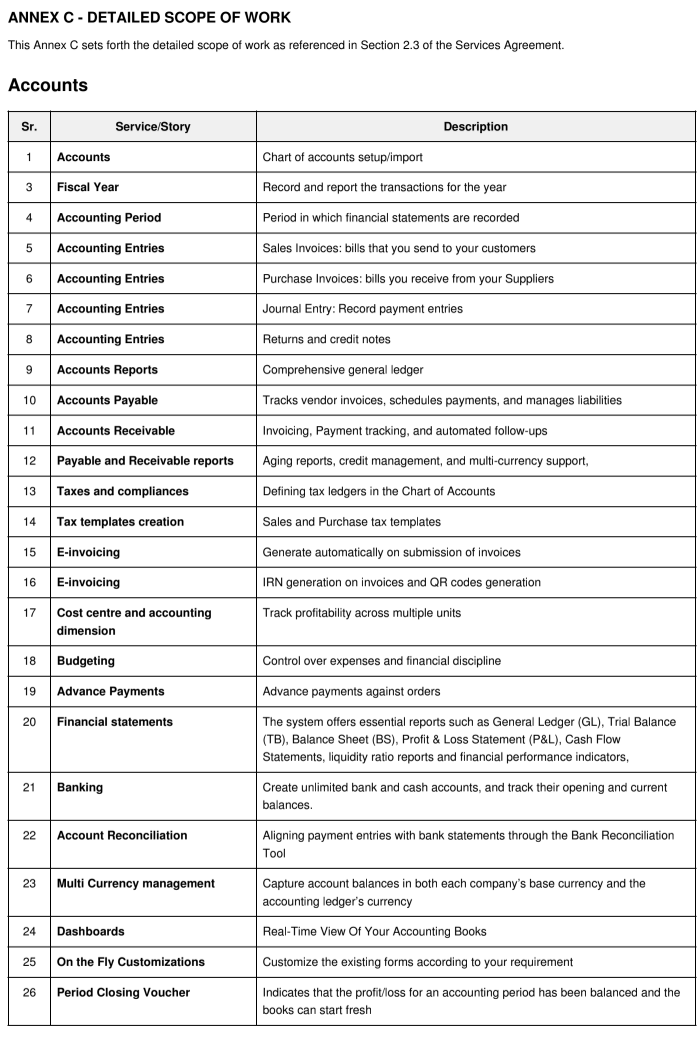
Once you're comfortable, we share a detailed scope and legal document, typically 30-50 pages, that forms the foundation of the project agreement.
CRM Intake & Approvals
Initial details are captured, approved, and saved in our CRM. You choose whether to send the proposal or keep it under review before committing.
Project Start & Invoicing
When scope is approved, the work begins.
We collect 30-50% in advance to begin your project. This ensures mutual commitment and lets us allocate the right ERPNext implementation team to your business from day one.
Access Requirements From Clients
What we need from you to start on time.
To ensure a smooth, timely start, Hybrowlabs requires key access, data, and documentation upfront.
| # | Requirement Category | Inputs Needed |
|---|---|---|
| 1 | System & Infrastructure Access | Server access (cloud/on-prem) or hosting setup details; domain and DNS access (if applicable); admin credentials for ERPNext (if already installed); access to third-party tools (CRM, eCommerce, payroll, etc. for integrations). |
| 2 | Data & Migration Inputs | Data exports from existing systems (masters, transactions, opening balances); data templates filled in agreed formats; clarity on data scope (what needs to be migrated vs archived). |
| 3 | Business & Process Documents | Process flows / SOPs (if available); reports, formats, and compliance requirements; Chart of Accounts, item masters, customer/vendor lists, etc. |
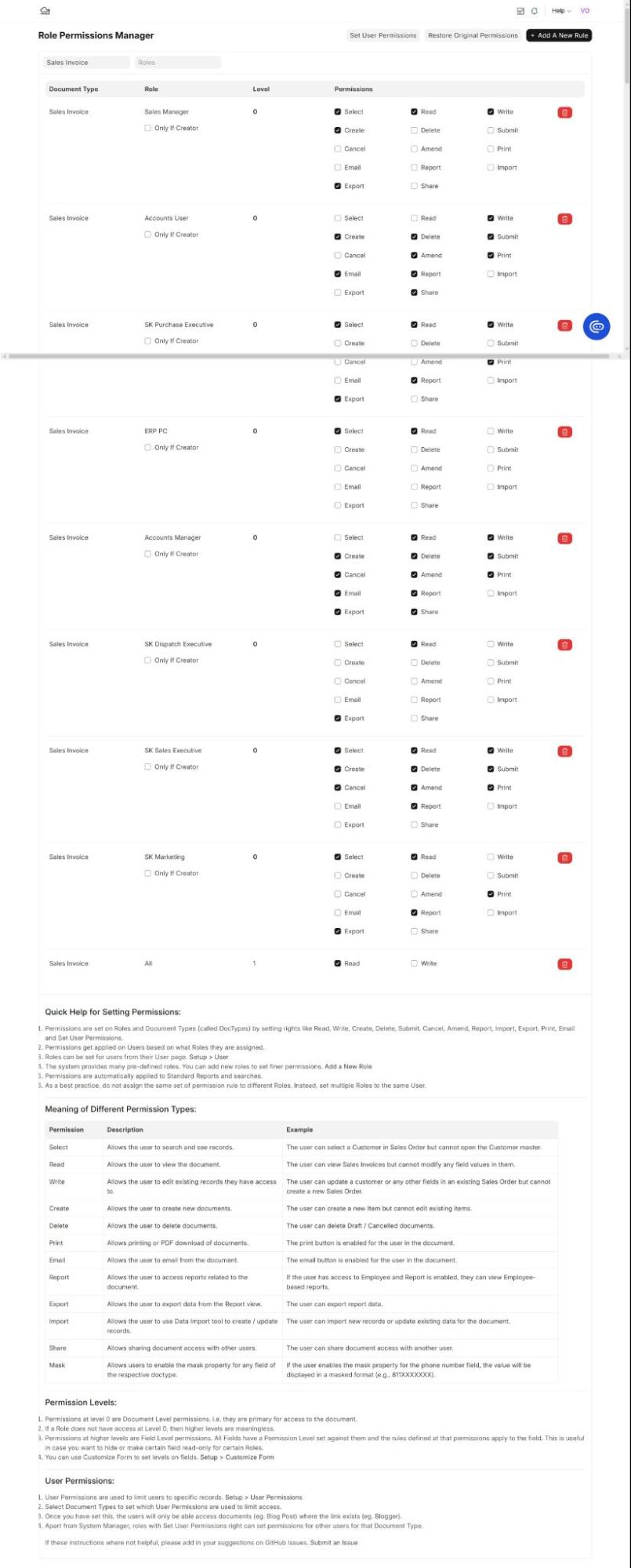
| 4 | User & Access Details | List of users, roles, and permissions required; approval hierarchies and workflows. |
| 5 | Compliance & Configuration Inputs | Tax structure (GST/VAT), regional settings, currencies; company structure (entities, branches, warehouses). |
Communication Setup
Clear channels, from day one.
Every task-level discussion happens on a named project channel, and every scope change runs through a formal change-control workflow.
| # | Communication Setup |
|---|---|
| 01 | Primary channels: Dedicated WhatsApp group for quick clarifications; email for formal approvals; ticketing/helpdesk for issues and bug tracking. |
| 02 | Project tools: Shared project board (Gantt/kanban), document repository, and a dedicated upload link for BRD materials. |
| 03 | Best practice: Use the named "ERPNext project communication channel" for all task-level discussions and a formal "ERPNext change control" workflow for scope changes. |
Business Requirements & Document Collection
Secure, traceable, and free of email chaos.
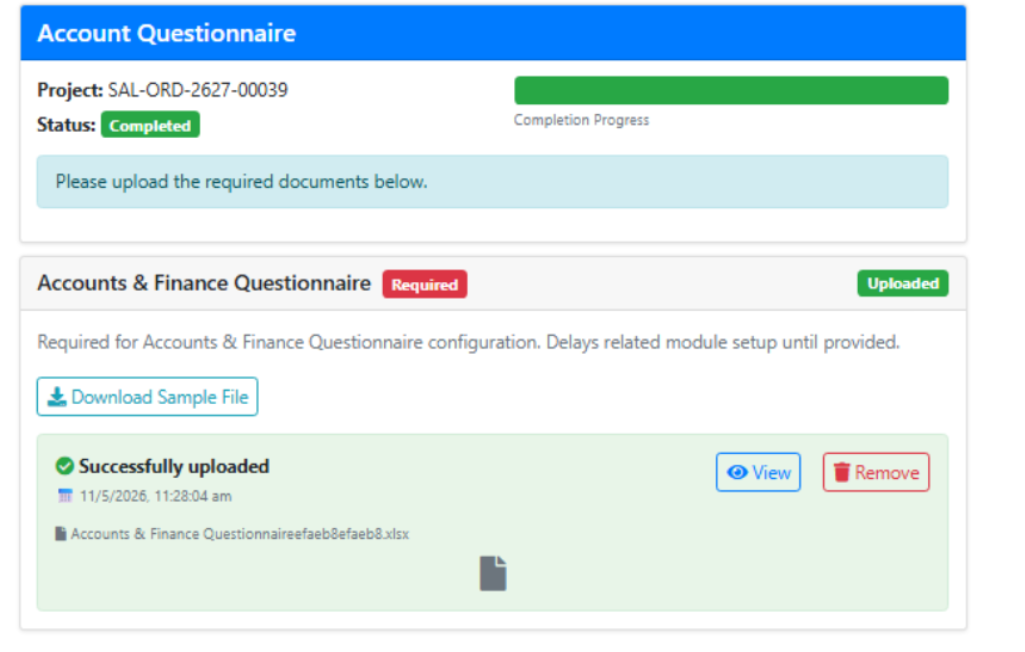
We send a predefined questionnaire to collect everything needed for a detailed BRD and give you a dedicated upload link so documents are shared securely.
- A predefined questionnaire captures the details needed for the BRD.
- A dedicated upload link replaces messy email attachments.
- The result is a clean, traceable onboarding with fewer delays.
Inside the BRD
A complete picture of your business
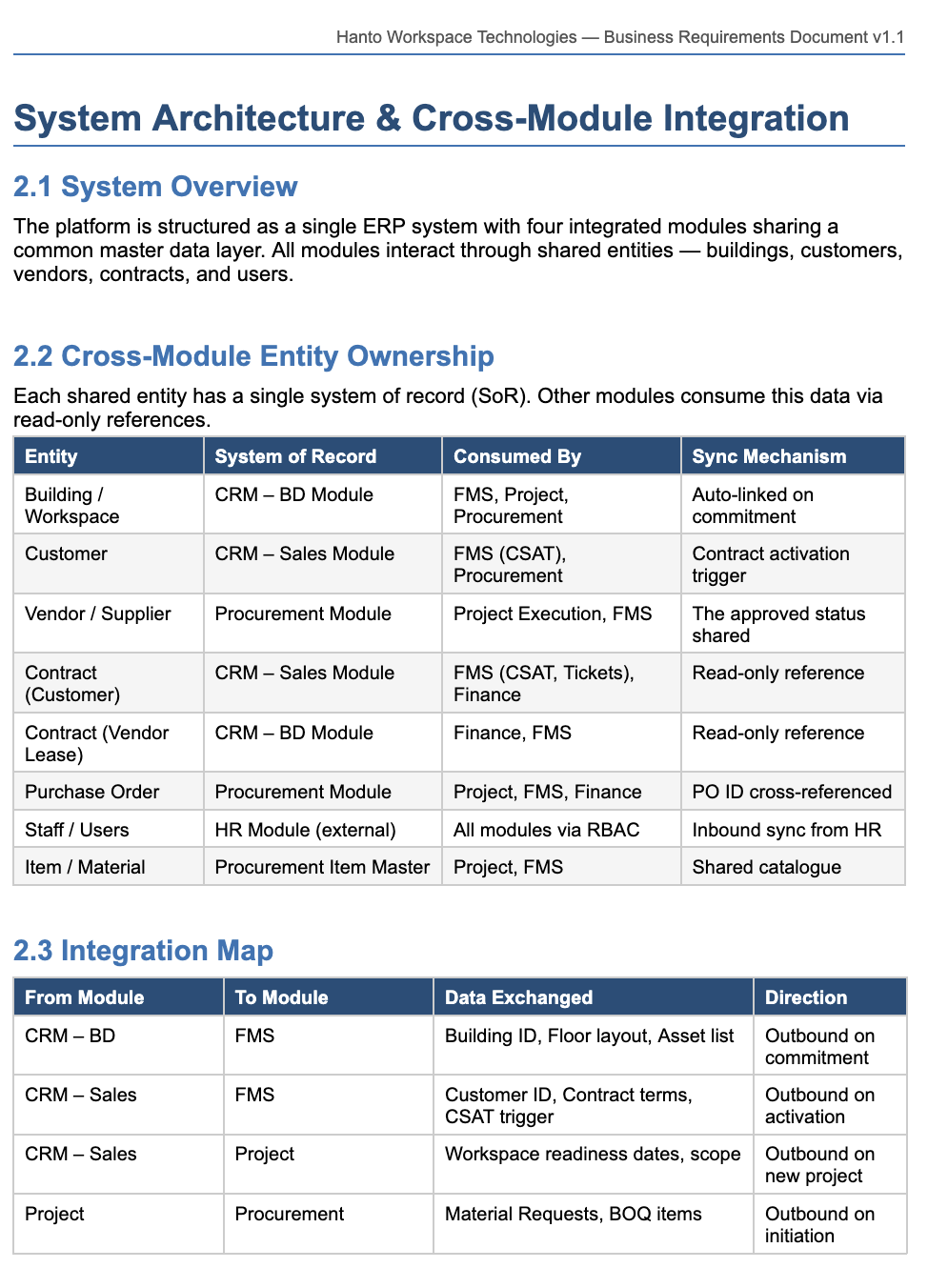
Your business requirements, current workflows, operational challenges, ERP process mapping, customisation requirements, approval hierarchies, integrations, and the proposed ERPNext solution design, all in one document.
BRD & Project Tracking
Complete transparency through every milestone.
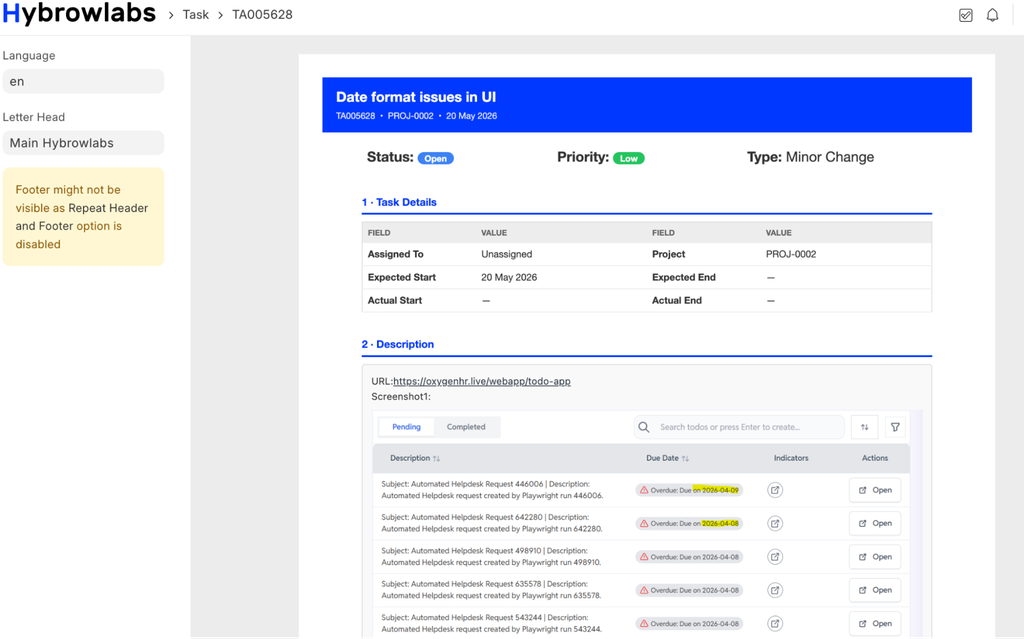
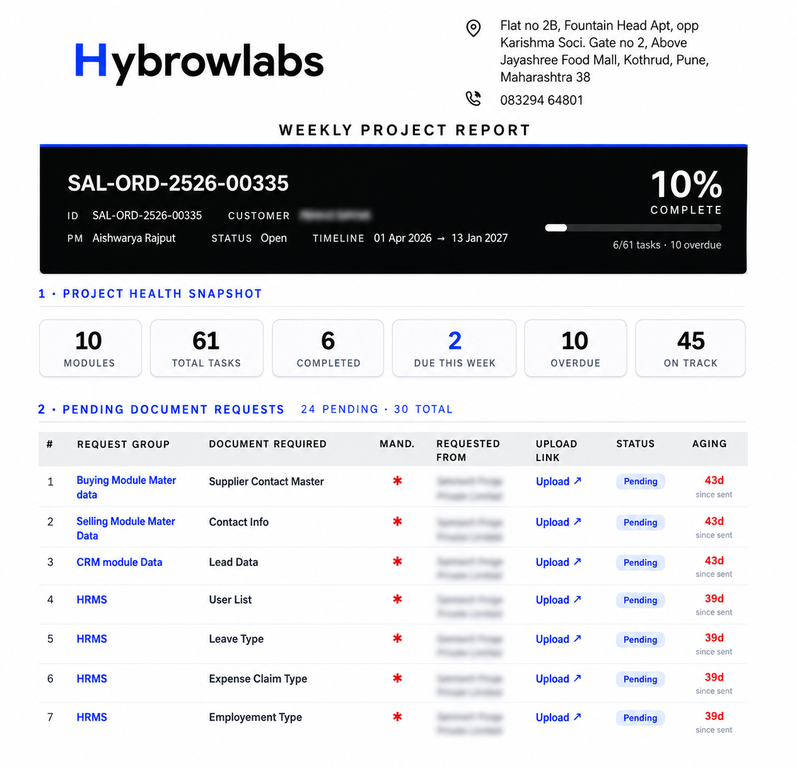
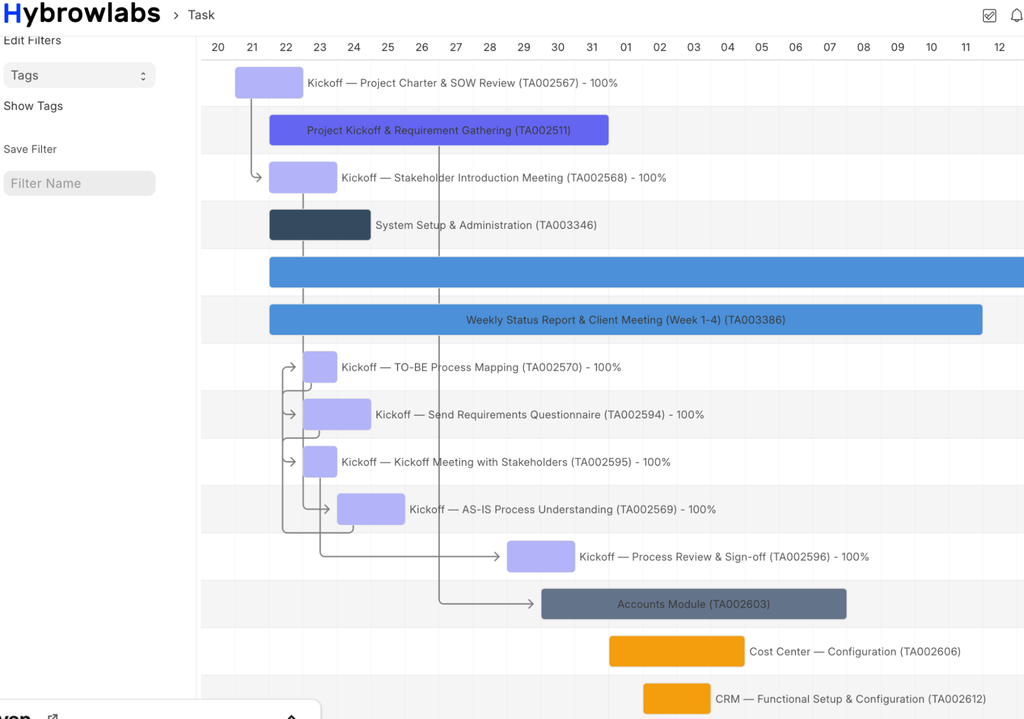
Progress and implementation milestones are shared continuously through our project-management and task-tracking platform.
Our ERPNext project tracking system ensures
- Better communication between teams
- Clear visibility into progress
- Faster issue and task resolution
- Structured deployment planning
- Improved accountability and timelines
This collaborative approach helps ensure a smooth, organised, and successful ERPNext implementation for your organization.
Approvals, Billing, Support & Handover
The questions every buyer asks, answered upfront.
| Your Question | Our Answer |
|---|---|
| How do we take sign-off? | We collect formal approvals at key milestones, including requirements sign-off, design acceptance, and final UAT completion. |
| How will we bill you? | Billing is milestone-based, with advance payment, periodic invoices, and agreed release criteria. |
| How will we support it? | Post-go-live ERPNext support, issue resolution, and ongoing maintenance as part of our customer support plan. |
| How will we hand it over? | Handover includes documentation, training, access to the ERPNext system, and a final review to confirm the solution is ready for your team. |