



How We De-Risk Your ERPNext Investment
Most vendors only show you the upside. We'd rather tell you where the work is, where the limits are, and exactly how we protect your investment against the things that usually go wrong in ERP projects. Honesty here isn't a risk, it's the reason our clients trust the roadmap we build with them.
Config First, Code Second
Every requirement can be met two ways: by configuration, such as settings, custom fields, scripts, report builders, and permissions; or by code, such as custom apps, server logic, and integrations. We always reach for configuration first, and only write code when your process genuinely needs it. The reason is simple: less custom code means cheaper upgrades, fewer bugs, and easier handover to your team.
Preferred — Config path
No code required:
- Custom fields & layouts
- Client & print scripts
- Report & dashboard builders
- Workflow builder & permissions
When truly needed — Code path
Custom development:
- Custom apps & server logic
- Third-party integrations
- Virtual DocTypes & jobs
- Bespoke business rules
Our rule: if configuration solves it, we don't write code. You pay for fit, not for complexity you'll maintain forever.
Your Customizations Stay Separate
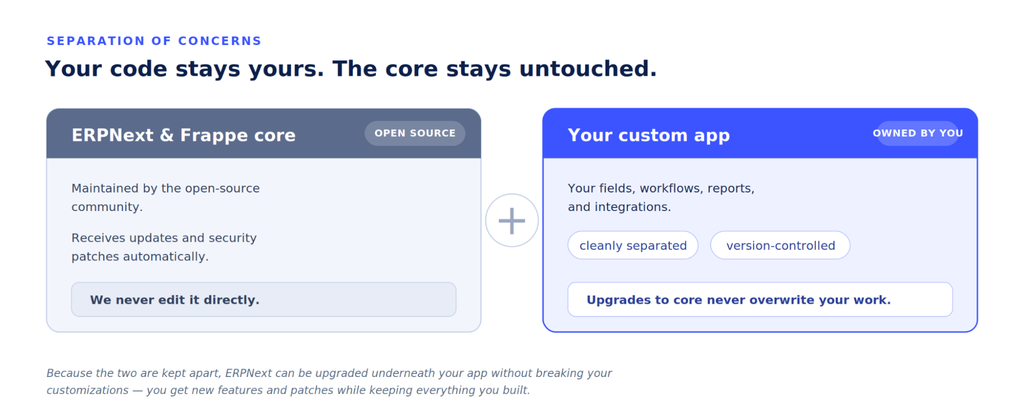
This is the single most important thing we do to protect your upgrade path. We never modify the ERPNext core. Everything we build for you lives in a separate custom app that sits alongside the core, so when the platform updates, your customizations don't break and your data stays intact.
What's Mature vs. What's Evolving
Not every capability in the platform is equally battle-tested, and we won't pretend otherwise. We classify capabilities into three honest tiers so your roadmap rests on solid ground and so you know which features to build on now versus which to plan for.
The Capability Honesty Ledger
A sample of how we rate what you'll rely on, by maturity and by how much effort it takes to use.
How to read this: Maturity tells you how proven a capability is. Effort tells you what's involved: Zero is a setting, Config is a few minutes with no code, and Light is a small amount of custom work.
Protecting Your Upgrade Path
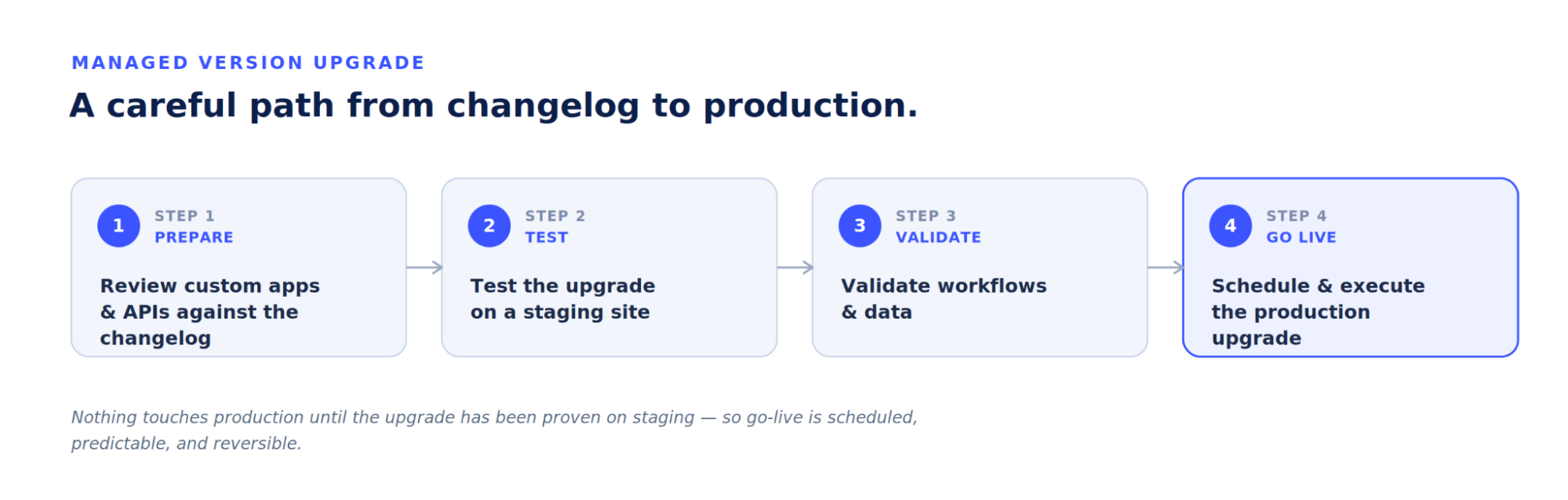
ERP platforms evolve. Because we keep your customizations in a separate app and lean on configuration over code, moving between major versions stays controlled rather than risky. Here's how we manage a version upgrade such as v15 to v16 or a newer version.
For Technical Buyers
If you're evaluating ERPNext against an in-house build or a heavier enterprise suite, here's the architecture pattern we recommend for ambitious deployments.
Recommended architecture for custom front-ends
For products that need a fully custom user experience on top of ERPNext, we use Frappe as the secure system-of-record and identity provider, with a dedicated front-end talking to it through a thin backend-for-frontend layer.
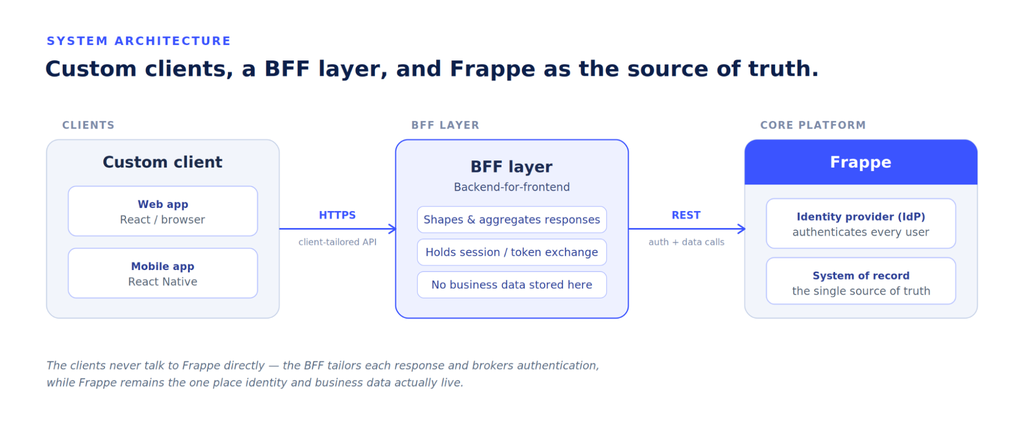
This keeps your business data, permissions, and audit trail in a proven core while giving you total freedom over the user-facing experience. You get the productivity of the platform and a bespoke product surface.
Frequently Asked Questions
Because hidden limits are what blow up ERP budgets and timelines. Telling you upfront which capabilities are mature, which are evolving, and what needs custom work lets you plan a roadmap that won't surprise you later.
Only if it's done badly. We keep every customization in a separate app that never touches the ERPNext core, and we prefer configuration over code wherever possible.
Money and risk. Configuration changes survive upgrades more easily, are faster to make, and are easier for your own team to maintain.
We review your custom apps and APIs, test the upgrade on staging, validate workflows and data, then schedule and execute the production upgrade through a documented process.
Yes. We use Frappe as the secure system-of-record and identity provider, with a custom client talking to it through a backend-for-frontend layer.